SIMnet Assignment Manager
Enabling instructors to manage their assignments without admin support
Overview
SIMnet is a digital learning platform for teaching Microsoft products like Word and Excel to college students. Instructors use SIMnet to organize course curriculum, track student progress, and manage assignments.
Adding and editing assignments is where instructors spend most of their time, but they rarely do it alone. Beyond basic setup, instructors struggle with tasks like bulk-updating due dates. When they get stuck, they give up and turn toward Customer Success specialists for help. Instructors need these changes immediately to stay focused on teaching, yet 15% of our instructors wait over 24 hours for support during peak back-to-school months.
In fall 2025, I led design on a cross-functional team to consolidate the assignment management experience. The redesign improved NPS by 6 points and empowered 20% more instructors to complete complex tasks independently.
Role
Product Design, UX Research
Duration
3 months
Empathize
Since the SIMnet team started tracking NPS using Pendo in 2024, assignment management ranked as the lowest performing feature in SIMnet.
23
Assignment NPS
26
Edit Assignments
20
Organize Assignments
22
Assign Assignments
33
Gradebook NPS
42
Overall NPS
Sourced from Pendo and UserTesting.com
Talking with customer success specialists, each shared the same type of story when asked about instructor gripes with assignment management.
Instructors will say…
I wanted to update all my assignment due dates, but wasn’t sure how.
I wanted to change the order of their assignments, but wasn’t sure how.
I wanted to show all my hidden assignments, but wasn’t sure how.
And the customer success specialist will almost always say…
Well, you are able to, but you need to do it in a certain way.
To get the full picture, we held interviews, usability tests, and reviewed a whole bunch more feedback we've gotten over the last year.
7
Instructors interviewed
2 newer instructors (< 2 years)
2 experienced instructors (2-10)
3 legacy instructors
10
Asynchronous usability tests
50+
Multi-survey responses
And much more!
Speaking directly with instructors and watching them struggle (and succeed) shone light on the specific areas we could improve upon.
Define
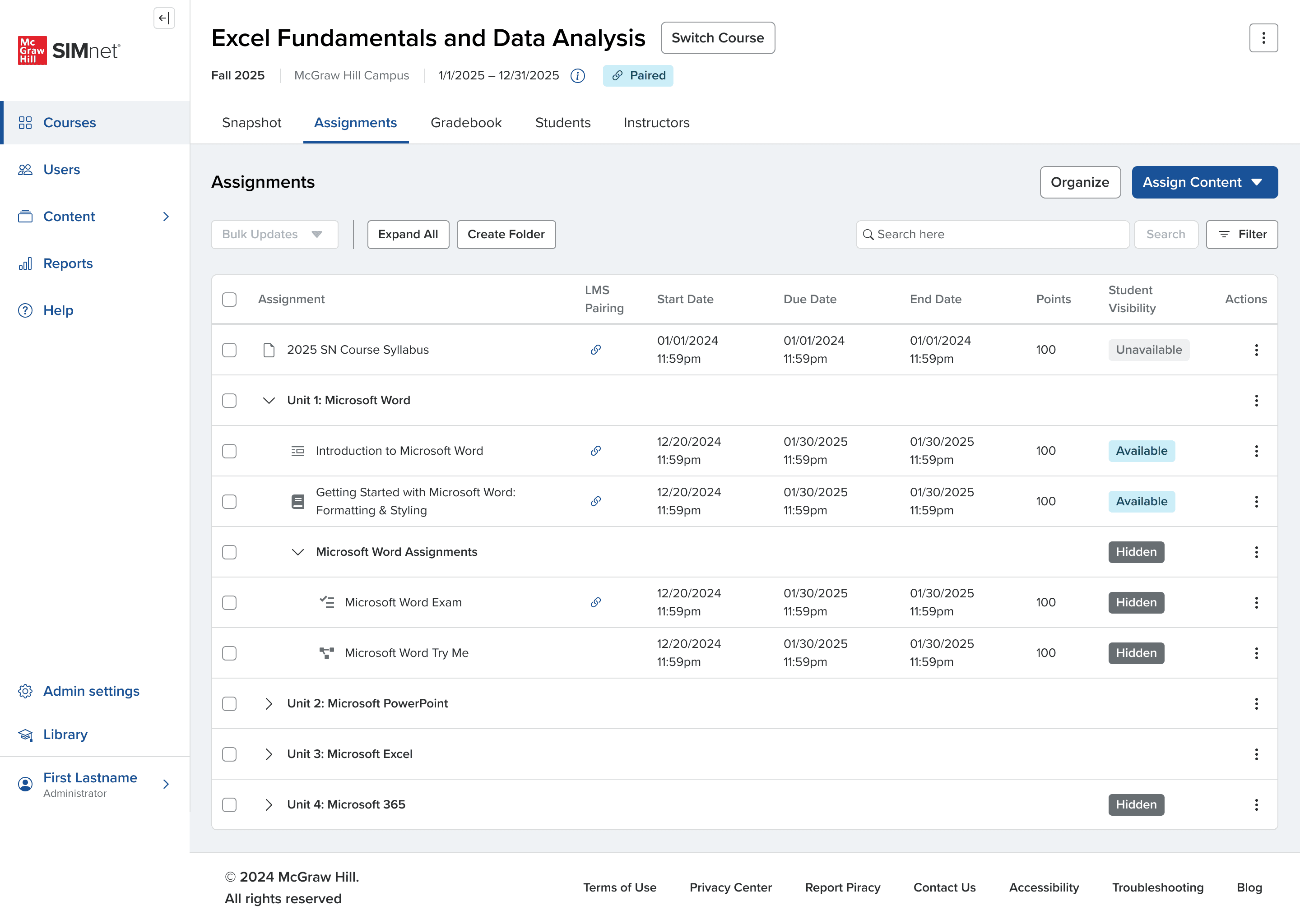
Common threads started to emerge. The research revealed a fundamental mismatch between how instructors think about their courses and how SIMnet forced them to work. Instructors naturally organize content hierarchically — courses contain units, units contain assignments — but the system scattered this workflow across three separate tools with inconsistent interfaces. Critical features like bulk scheduling and drag-and-drop were either broken or hidden, forcing instructors to rely on Customer Success for routine tasks.
23
Assignment NPS
26 Edit & Assign
20 Organize
42
Overall NPS
33
Gradebook NPS
Sourced from Pendo and UserTesting.com
Four priorities emerged: consolidate three disconnected tools into one unified interface, make the Course → Unit → Assignment hierarchy visible and consistent, surface bulk actions and drag-and-drop for efficiency, and build with accessibility in mind.
Success meant instructors could set up courses independently, reducing assignment-related support tickets, improving NPS, and cutting setup time.
Iteration
Restructuring the Foundation
We unified views by starting at the organizer tree grid, as it was the most powerfully and flexible off the current three.
[ Centralized location with single and bulk actions ]
We tried to consolidate the levels of nesting to represent an instructors mental model of course unit assignment and match what an instructor will see in their lms like canvas, but regular check-ins showed that especially DFCs and long time users needed at least three levels of nesting to operate.
[ defining the level of nesting based on competitive analysis and instructor requirements ]
We tried out how other platforms implement accessible drag and drop.
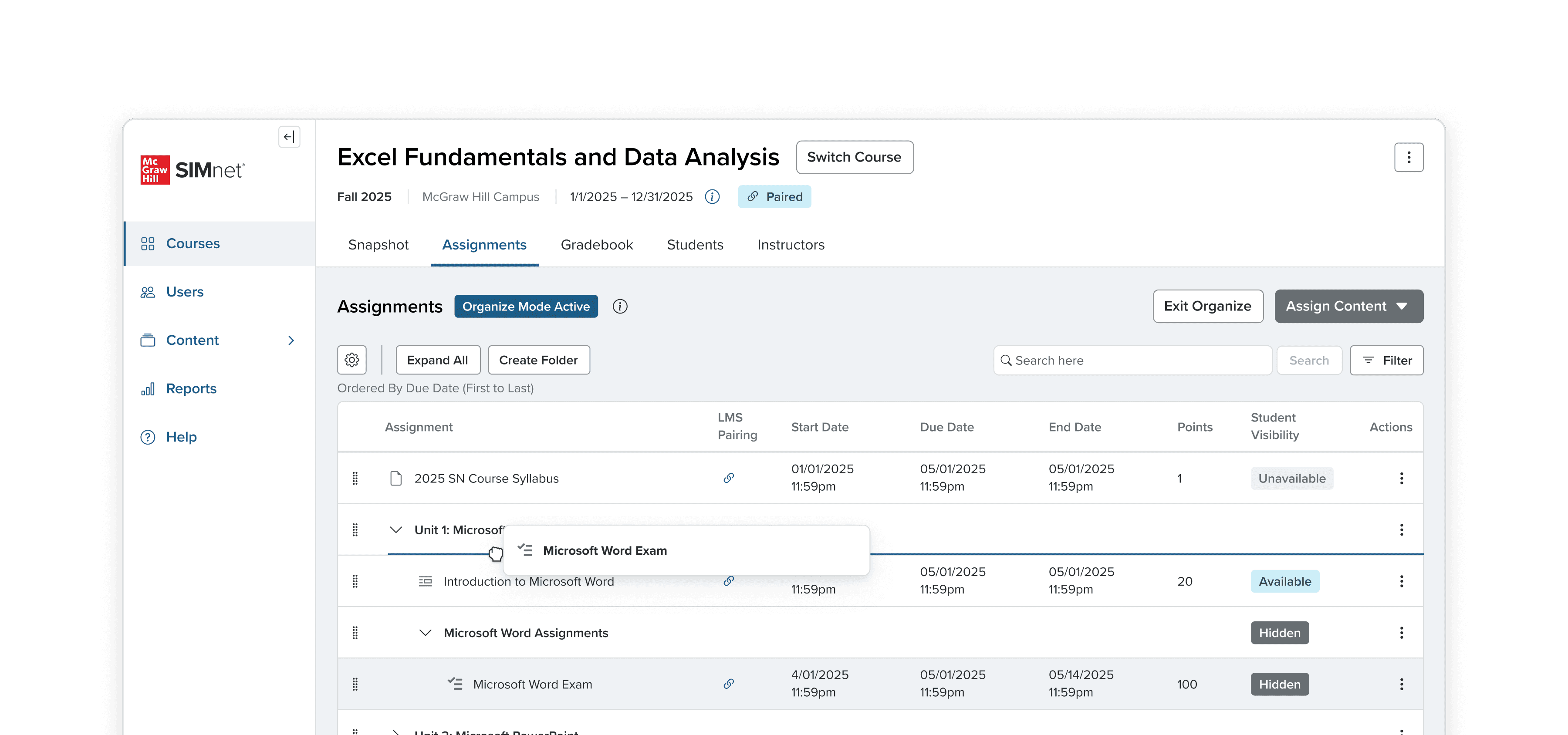
[ adding organize to that page ]
we did a user test to determine if this was best, but quickly learned that all of this overwhelms instructors. It might work for someone in tech using JIRA, but instructors need simplification.
When we tested it too, there was so much confusion that the checkboxes and bulk actions would also control the drag and drop handles.
[ Separate mode for organizing because xyz ]
[ an in depth solution that was aligned with stakeholders on drag and drop. Accessible as well]
Results & Impact
Validation Through Research
Before launch, the redesigned assignment management experience went through multiple rounds of testing with measurable improvements.
Assignment management NPS increased from 24 to 32, an 8-point jump that moved the feature closer to the platform average. Instructors completed setup tasks 40% faster and persisted longer before seeking help, indicating the interface was more intuitive. An overwhelming majority of instructors preferred the unified tree grid approach over the legacy experience.
Post-launch, we expect to see reduced support tickets during back-to-school season. Early signals were strong enough to move forward with confidence.
Reflection
The biggest lesson I'll take away from this project is that ideal process and experiences aren't always the right answer, and that trusting and leaning on my team is just as important as best design practices.
I was convinced that for assignment organizing, instructors would want it on screen with the rest of assignment tools. It's what other modern tech products like Jira do. However, my stakeholders had a suspicion that it would be too overwhelming for instructors, particularly long-time professors and new instructors to SIMnet. The rapid validation prototype testing we did proved my stakeholders right. Although not the "ideal" solution, it was the right one for our product and the people who use it.
Understanding your specific users matters more than following established design patterns.