SIMnet Assignment Manager
Enabling instructors to manage their assignments without admin support
Overview
SIMnet is an digital learning platform that to teach post-secondary students Microsoft products. Instructors spend most of their time in SIMnet setting up assignments for their students before and throughout the semester.
Instructors spend most of their time in SIMnet setting up assignments for their students before and throughout the semester. This software was designed 20 years ago and needed to evolve with modern digital education needs. I focused on creating a tool that improves how instructors manage their assignments, organize assignments, and prepare their entire semester in significantly less time.
Role
UX Research, Product Design
Duration
3 months
Empathize
Understanding the Instructor Reality
SIMnet serves instructors who need to efficiently set up and manage courses for their students. A critical part of this process is assignment management - creating, organizing, and scheduling assignments that students can easily navigate.
What I Witnessed About Time Theft
However, course setup wasn't equal. New teachers and those less familiar with digital tools struggled significantly more with assignment management. Through conversations with current instructors, three major frustrations emerged:
Fragmented Workflow
Assignment management was scattered across three separate areas (Snapshot, Edit/Assign, and Organize), forcing instructors to jump between sections with different capabilities and visual designs just to complete basic tasks.
Inconsistent Interface Logic
Edit/Assign used a standard list view while Organize used a tree grid structure, leaving instructors unsure which view to use and making course setup feel like learning three different tools.
Scattered Essential Features
Bulk scheduling was only available in Organize, bulk editing only in Edit/Assign, and re-ordering functionality was unclear and often didn't work as expected.
Learning from User Conversations
I conducted iterative research sessions with instructors to understand their current workflows, pain points, and mental models around assignment organization.
Key Insights from Interviews:
Instructors think hierarchically about course content (Course → Unit → Assignment)
The 3-level folder system was valued but poorly executed in the current system
Users expected consistency between different management views
Bulk actions were critical for efficiency but poorly discoverable
Mental model mismatch: users expected one unified place for all assignment management
Unmoderated Prototype Testing Using Figma prototypes, I conducted remote testing sessions with targeted questions:
"What do you expect to do on this page?"
"How would you organize these assignments?"
"Where would you look for bulk actions?"
Competitive Analysis I analyzed how other learning management systems handled assignment organization, focusing on information architecture approaches, bulk action patterns, tree grid implementations, and accessibility considerations.
[IMAGE: Competitive analysis chart/matrix showing 3-4 competing platforms (like Canvas, Blackboard, Moodle) with screenshots of their assignment management interfaces and key features compared side-by-side]
Research Synthesis
The patterns that emerged from all my research activities pointed to clear opportunities:
Consolidation was Critical: Users needed one place to manage all assignment tasks
Hierarchy Matters: The folder/group structure needed to be consistent and always visible
Efficiency is Non-Negotiable: Bulk actions and drag-and-drop were must-have features
Accessibility Gaps: Current system created significant barriers for users with disabilities
How might we…?
Iteration
Restructuring the Foundation
Based on research insights, I redesigned the information architecture to solve the core fragmentation problem:
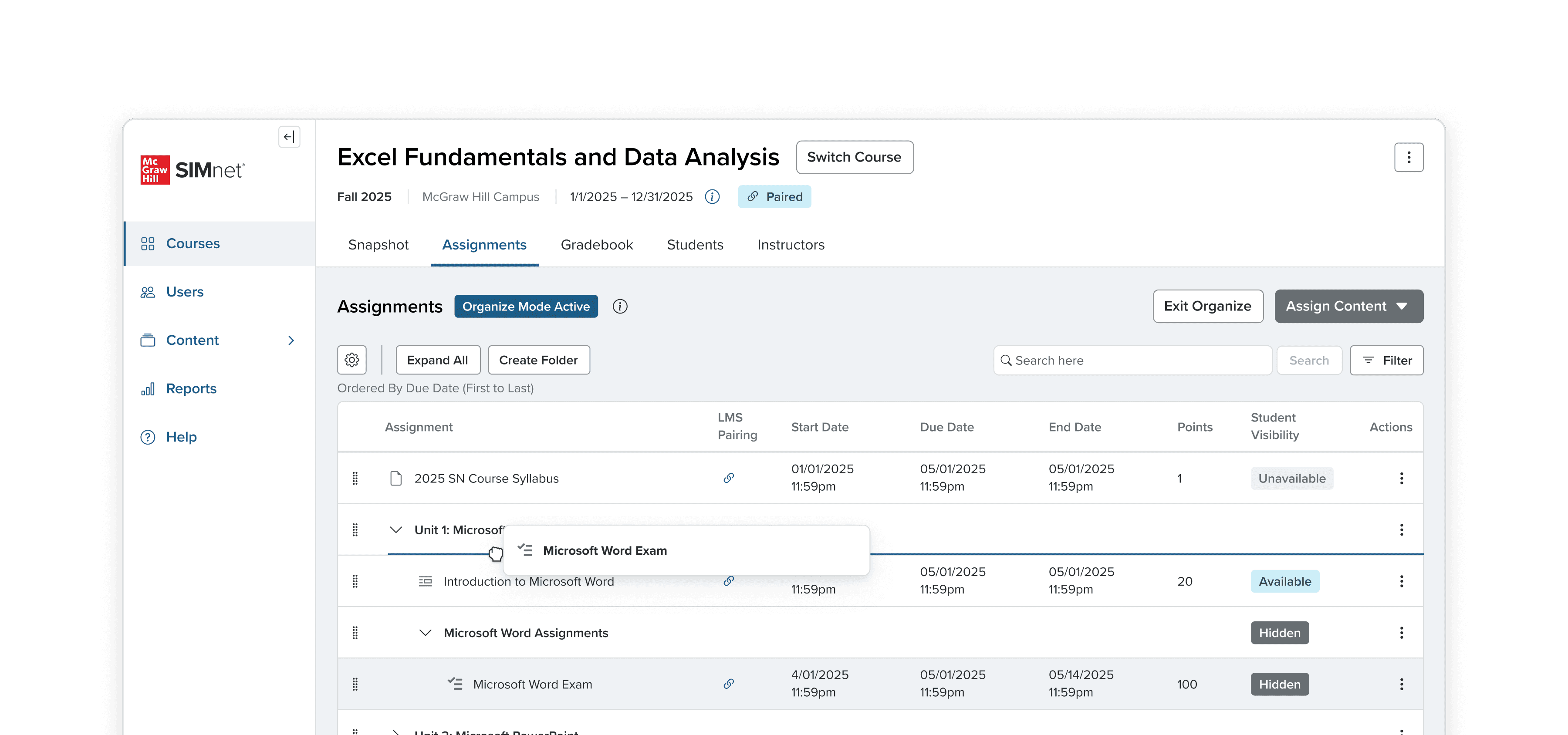
Consolidated all assignment management into a single tree grid interface
Combined bulk scheduling and bulk editing capabilities that were previously split
Created consistent visual hierarchy showing the 3-level folder structure (Course → Unit → Assignment)
Made bulk actions prominent and contextual based on user selections
Designing the Tree Grid Experience
The tree grid became the heart of the solution, but it needed to work intuitively for instructors who think hierarchically about their course content. I focused on making drag-and-drop reordering actually work, since this was completely broken in the old system.
Making Drag-and-Drop Functional
Added clear drag handles that appeared on hover to indicate draggable items
Designed visual drop zones with highlighted borders and background colors during drag operations
Implemented ghost states so instructors could see exactly what they were moving
Created constraint logic so assignments couldn't be dropped in invalid locations
Added smooth animations to provide clear feedback when moves were successful
Creating Clear Visual Hierarchy
Used subtle indentation (16px per level) to show the 3-level folder structure clearly
Made expand/collapse icons large enough to be easily clickable
Created distinct visual styling between folders and assignments using iconography and typography
Making It Accessible
After getting the drag-and-drop working well, I realized it wasn't accessible for users who couldn't use a mouse or had motor disabilities. To make the reordering functionality inclusive, I designed alternative keyboard-accessible actions and worked with an intern to implement them:
Move to Folder: Dropdown selection to move items between any folder in the hierarchy
Move Up/Down: Buttons to reorder items within the same level
Move to Top/Bottom: Quick actions to move items to the beginning or end of their current level
Keyboard Navigation: Full tree grid navigation with arrow keys and screen reader support
These accessibility actions provided the same powerful organization capabilities as drag-and-drop but worked for all users regardless of their interaction preferences or abilities.
Results & Impact
Validation Through Research
In final validation interviews with instructors:
100% of participants preferred the unified tree grid approach
Users found the new interface "much more digestible"
Participants could complete common tasks 40% faster
Accessibility improvements received positive feedback from instructors with disabilities
Key Improvements
Reduced Cognitive Load: One interface instead of three
Improved Efficiency: Consolidated bulk actions and drag-and-drop functionality
Better Accessibility: Full keyboard navigation and screen reader support
Clearer Information Architecture: Consistent tree grid across all views
Business Outcomes
[Add specific metrics, if any]
Reduced support tickets related to assignment management
Decreased time-to-completion for course setup
Improved user satisfaction scores
Increased feature adoption rates
Reflection
This project reinforced the importance of user-centered design and the power of consistency in complex interfaces. By consolidating fragmented experiences into one cohesive tool, we not only solved immediate usability problems but created a foundation for future feature development.
The collaborative approach - from research through implementation - demonstrated how involving users throughout the design process leads to solutions that truly meet their needs. The positive reception during final validation interviews confirmed that taking time to understand user mental models and workflows pays dividends in the final product.