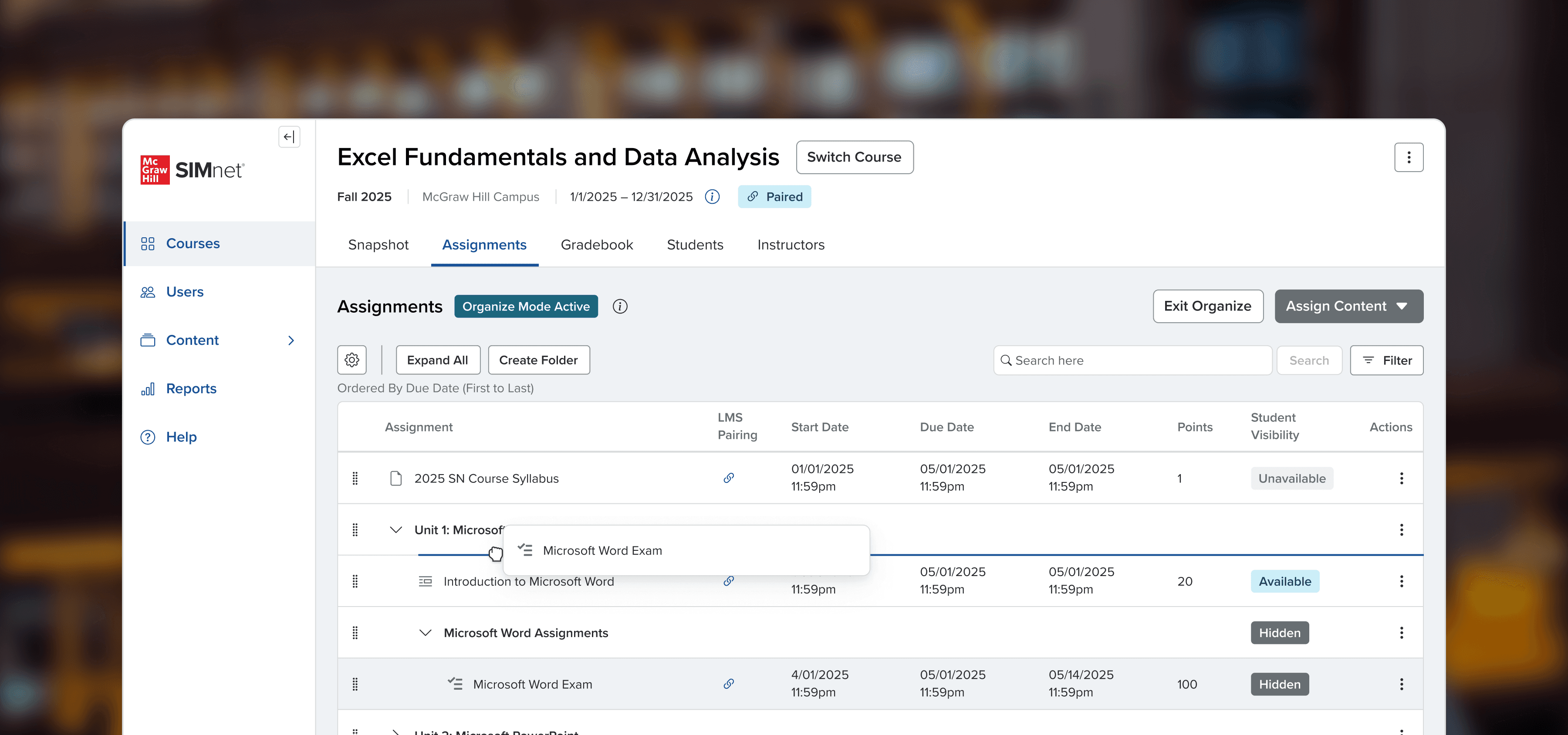
SIMnet Assignment Manager
Empowering instructors to manage their assignments independently
Overview
SIMnet is a learning platform for teaching Microsoft products to college students. Instructors spend most of their time managing their assignments but rarely do it alone. Beyond basic setup, they heavily rely on customer success specialists, unaware that the features they need already exist, just scattered across disconnected workspaces.
In fall 2025, I led design to consolidate the assignment management experience so that instructors could manage their assignments independently. SIMnet's assignment NPS improved by 6 points and task completion rates increased from 20% to 90%.
Role
SIMnet Lead UX Designer including product design, accessibility, design systems, and research
Duration
3 months
Key Stakeholders
Product Owner Janet Boring
Technical Product Manager Dani Derringerzhang
Director of Engineering Torger Wuellner
Senior Front-end Developer Abhinav Singh
Accessibility Coach Vivek Pinto
Highlights
Instructors + Admins
Task completion rates increased from 20% to 90%.
Business
Projected
40% of customer success specialists bandwidth freed.
Organization Wide
Patterns adopted by 15+ designers and 10+ teams.
Empathize
Managing assignments ranked lowest in platform's NPS score
Since the SIMnet team started tracking NPS using Pendo in 2024, assignment management ranked as the lowest performing feature in SIMnet.
36
33
39
23
Pendo survey, assignment NPS scored lowest
Research
We held interviews, usability tests, and reviewed feedback we've collected over the last year.
7
Instructors interviewed
2 newer instructors (< 2 years)
2 experienced instructors (2-10)
3 legacy instructors
10
Unmoderated usability tests
50+
Multi-survey responses
Q3 2024 – Q3 2025
When we talked with customer support specialists,
They agreed, each sharing a similar story when asked about what instructors struggle with the most.
Instructors would reach out saying,
I can't figure out how to update all my due dates at once.
I want to reorder my assignment, but forget where I go to do that.
I heard I can schedule pop quizzes, but I can't find it anywhere.
And customer success would always respond…
That feature exists, but it's located somewhere else.
Instructors struggled to complete tasks on their own
Throughout interviews, even once an instructor was nudged to the right workspace, only about 20% of instructors were able to complete tasks. However, some instructors found solutions to tasks like bulk editing by painstakingly editing assignments one at a time, which was even more undesirable.
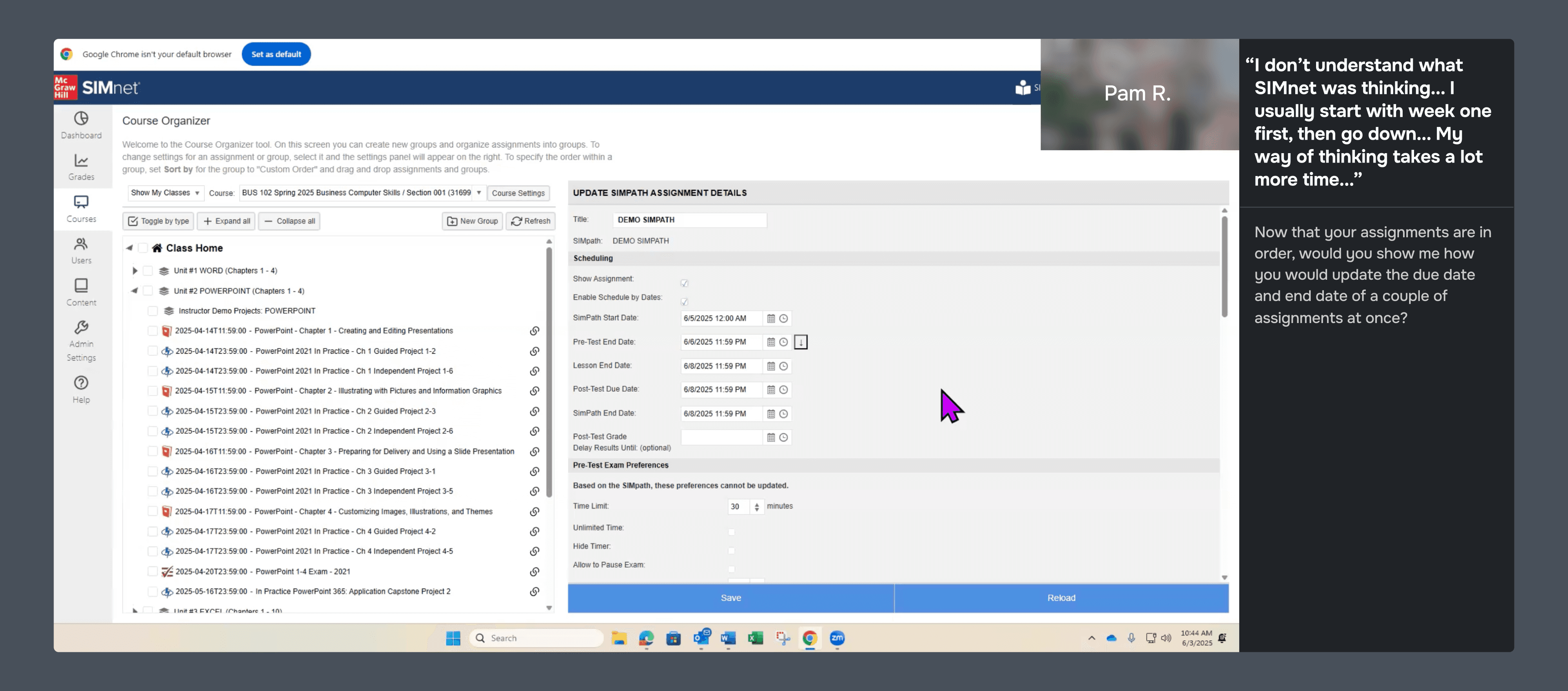
Pam R. showing their work-around to edit assignments dates in bulk
Define
Research revealed two compounding problems. Instructors struggled to discover features, and when they did, the interfaces made tasks nearly impossible to complete independently.
Instructors discover one workspace
Usually Organize, or whichever they encounter first
Learn features available in that workspace
Treat it as the complete experience
Hit a task their workspace can't do
Unsure where to navigate to or how to accomplish the task
Call customer support
For features that already exist
Navigate to another workspace
Successfully finds where the feature lives
Can't figure out how to activate it
Core actions are buried and unintuitive
Call customer support
For features that already exist
Instructors learn one and forget the rest
Instructors have a single-context mental model, but assignment management spans 3 distinct workspaces. Especially for new (<2 years) and legacy instructors (10+), any feature outside their primary workspace is effectively invisible to them.
An instructor in the organize workspace, for example, had no idea they could bulk-edit assignment details in the edit workspace. We needed to consolidate these disconnected spaces into a single, unified experience so that the platform could match instructors' mental models.
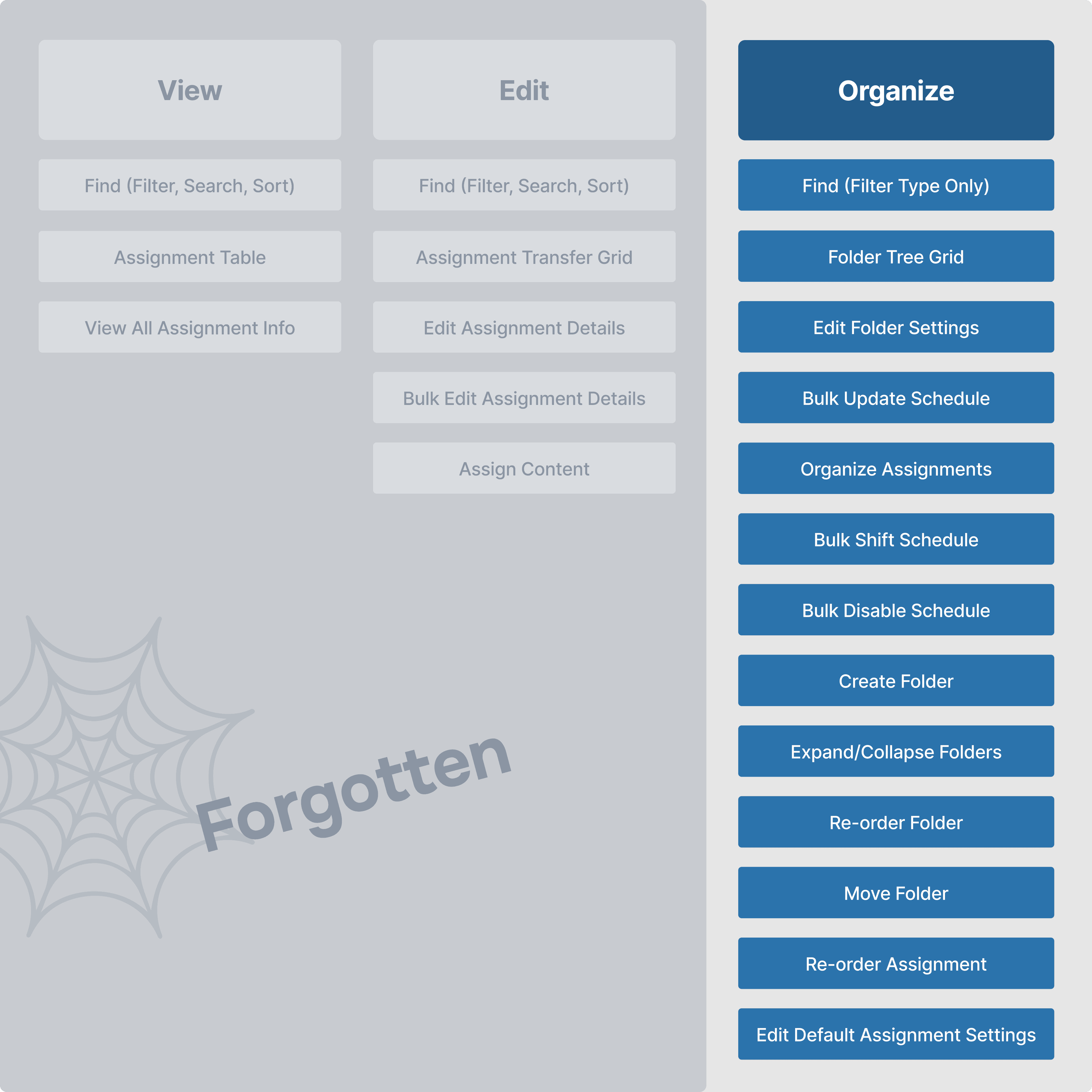
Core actions are hard to find and even harder to use
Even within the workspaces, these actions are hidden behind complex drag clicks, or weren’t registering with instructors.
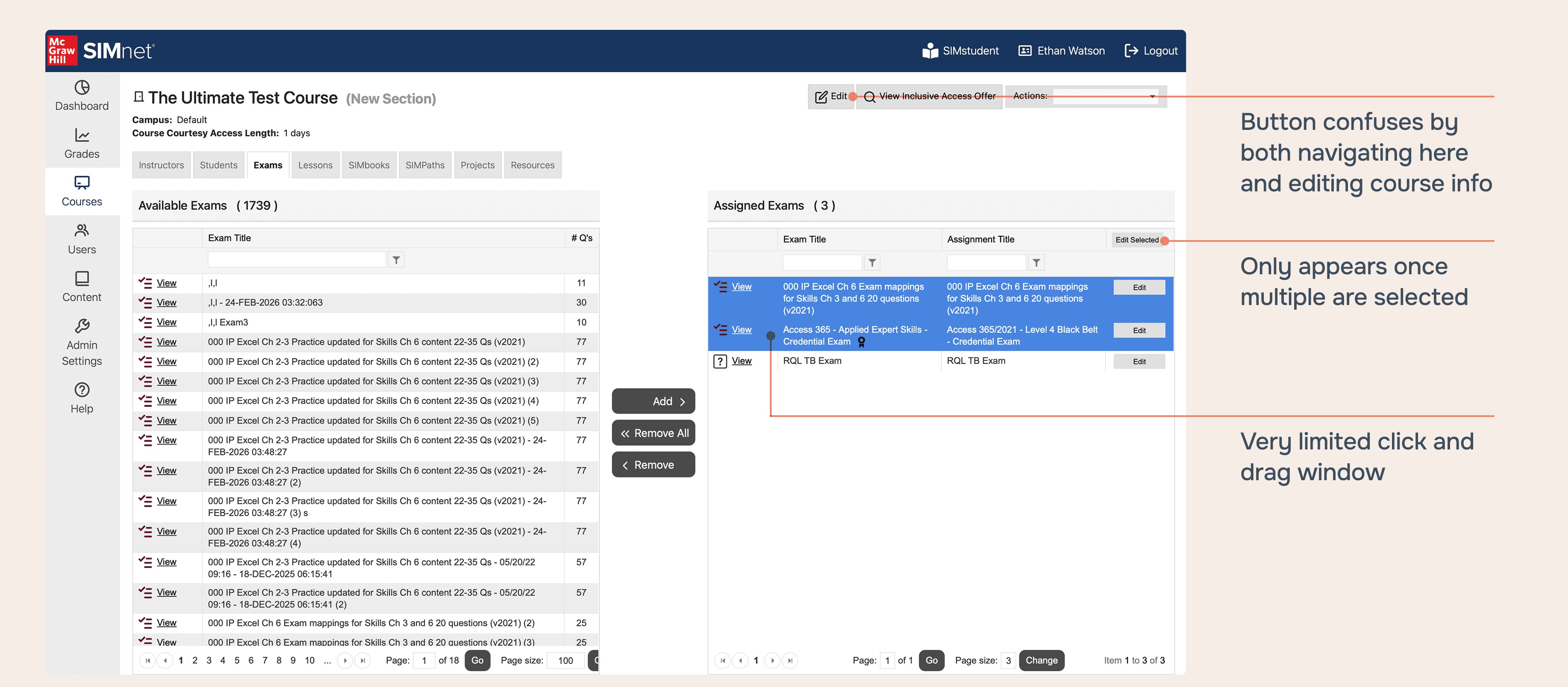
Instructors stumped when trying to bulk-edit
Bulk-editing was hidden behind a complex drag click selection within a two grid page.
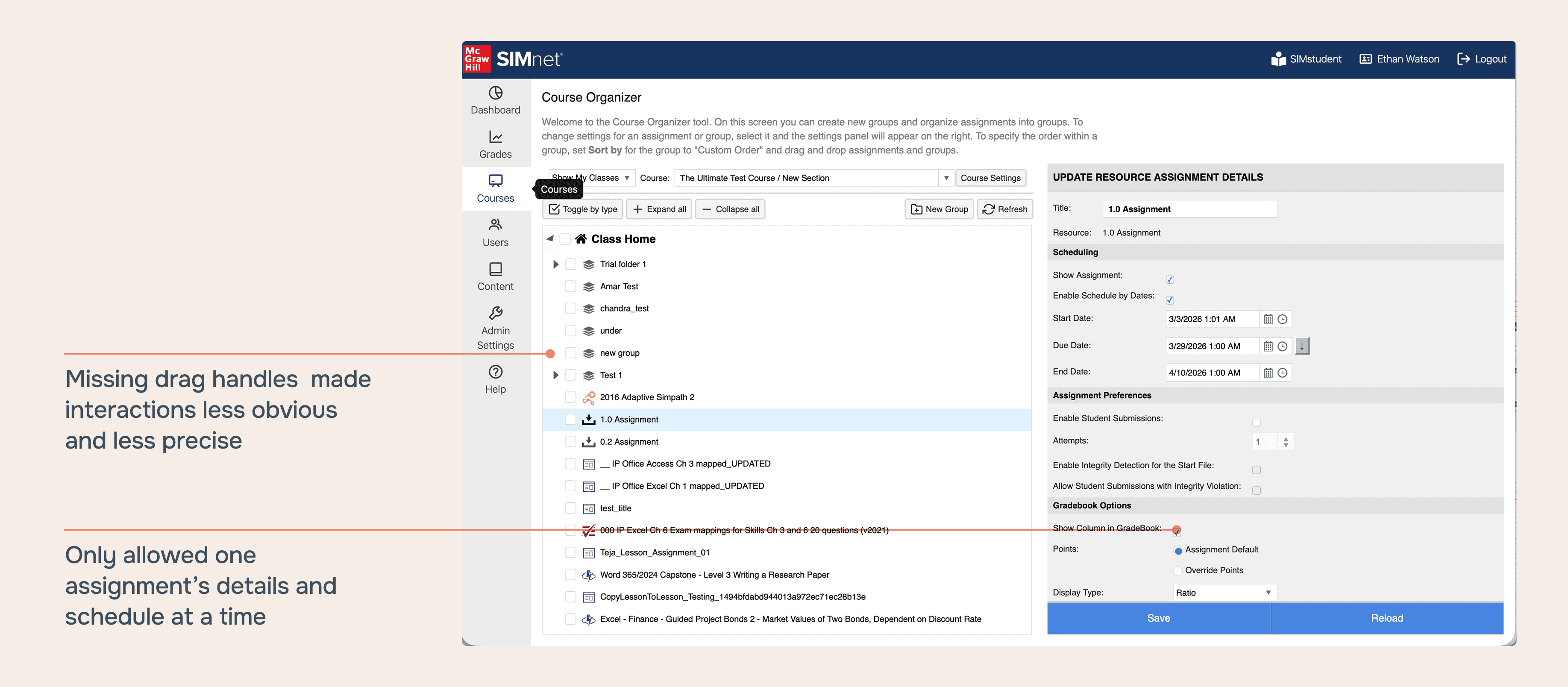
Organizing was just as challenging to activate
Tasks like bulk-editing and organizing assignments proved hardest to complete on their own, whether that was navigating to the right workspace or knowing how to activate the feature once there.
How might we empower instructors to manage assignments independently by consolidation and refinement?
Design
Consolidate
Our must-have constraints included organizing nested folders, preserving bulk actions, and keeping crucial data visible.
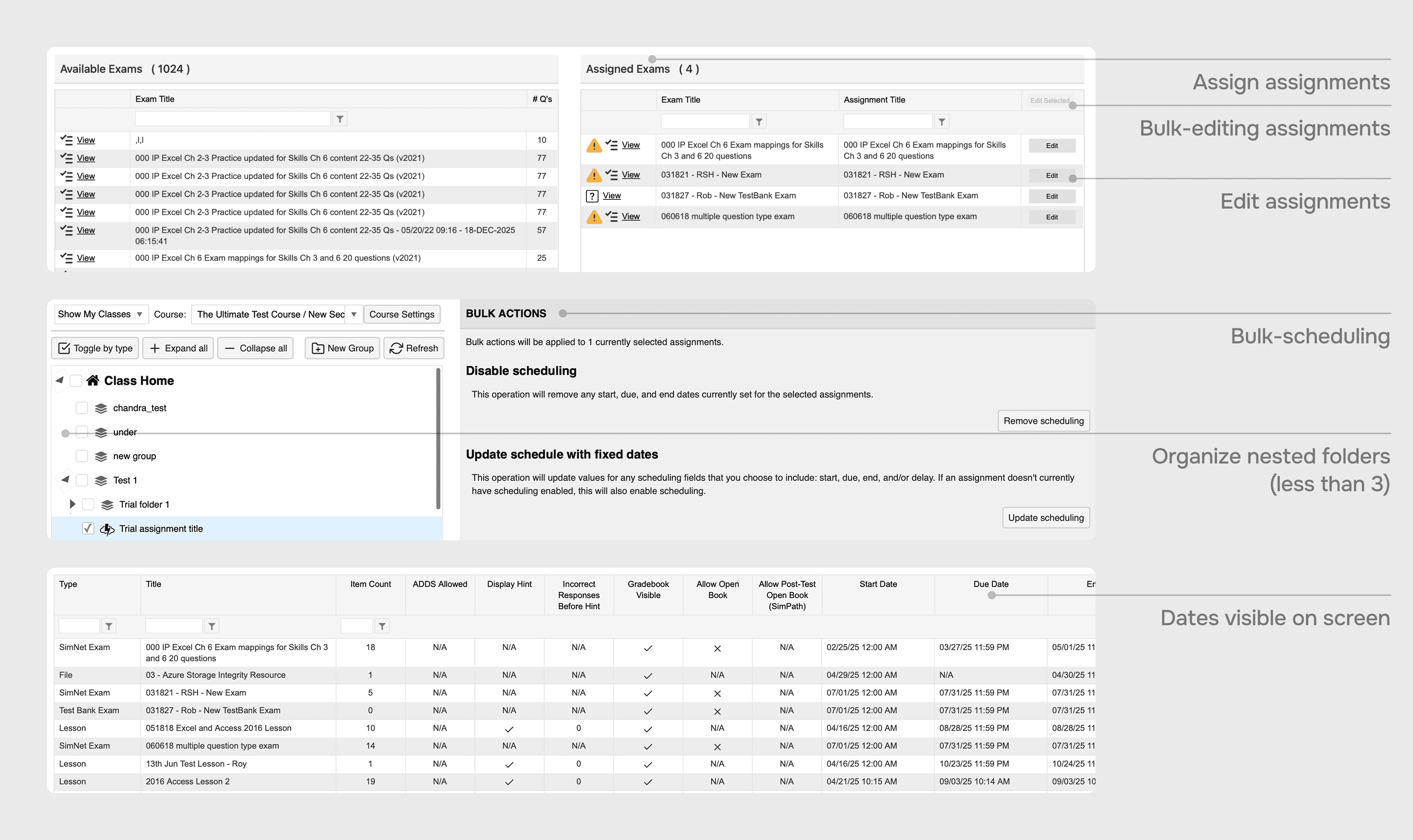
Our must-have constraints
Validating with competitive analysis
Leading learning management systems (Canvas, ALEKS) and organizational tools (Jira, Google Drive) keep complex actions like multiselect and drag and drop in a single, consistent workspace. We took that as our starting point.
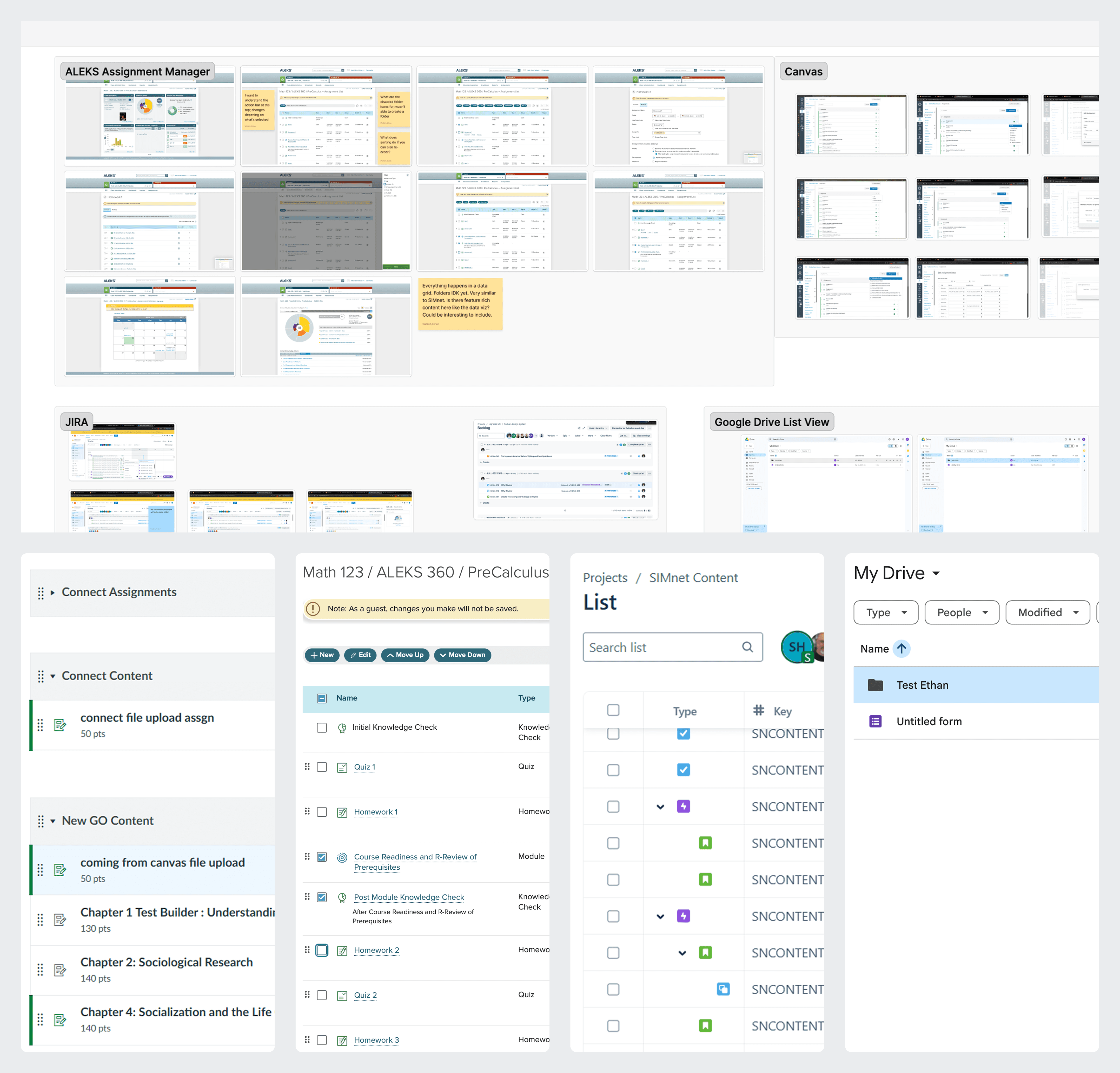
Canvas, ALEKS, Jira, and Google Drive
Our first concept was a unified workspace: a single tree grid where instructors could view, edit, and organize all assignments in one place.
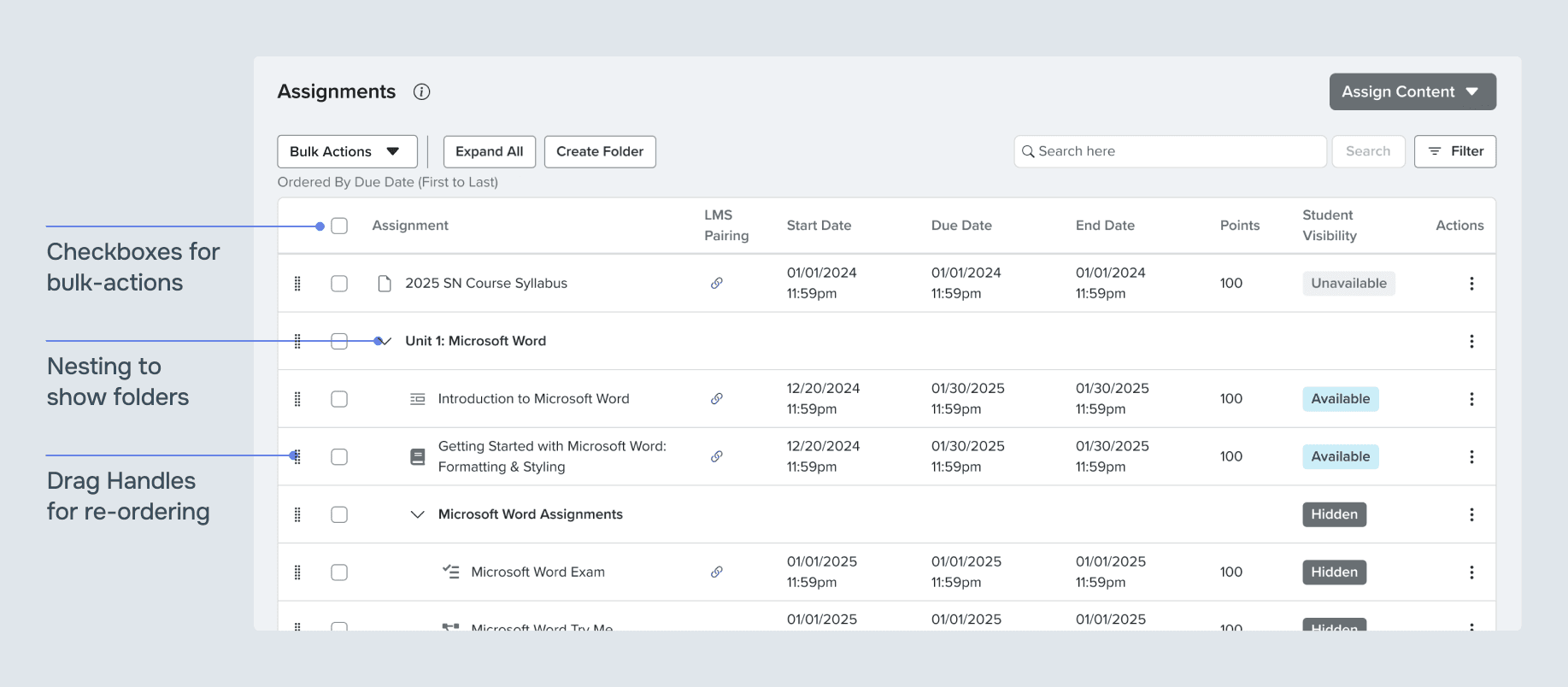
View, edit, and organize in one workspace
When we started testing instructors on tasks with the new concept, three findings stood out.
Rapid prototyping with our design system quickly revealed 3 things:
Reduced cognitive load
Instructors agreed the unified layout was easier to understand and use
Navigation solved
100% of instructors successfully found where to manage assignments
However,
New and legacy instructors struggled with having both bulk editing and organizing tasks available at one time.
Since instructors only organize a few times a semester, having both modes visible at once was more than they needed. We pivoted to a dedicated organize mode, keeping the main workspace clean while still making it easy to get to. An identical layout with drag handles instead of checkboxes made the transition feel familiar rather than like learning something new.
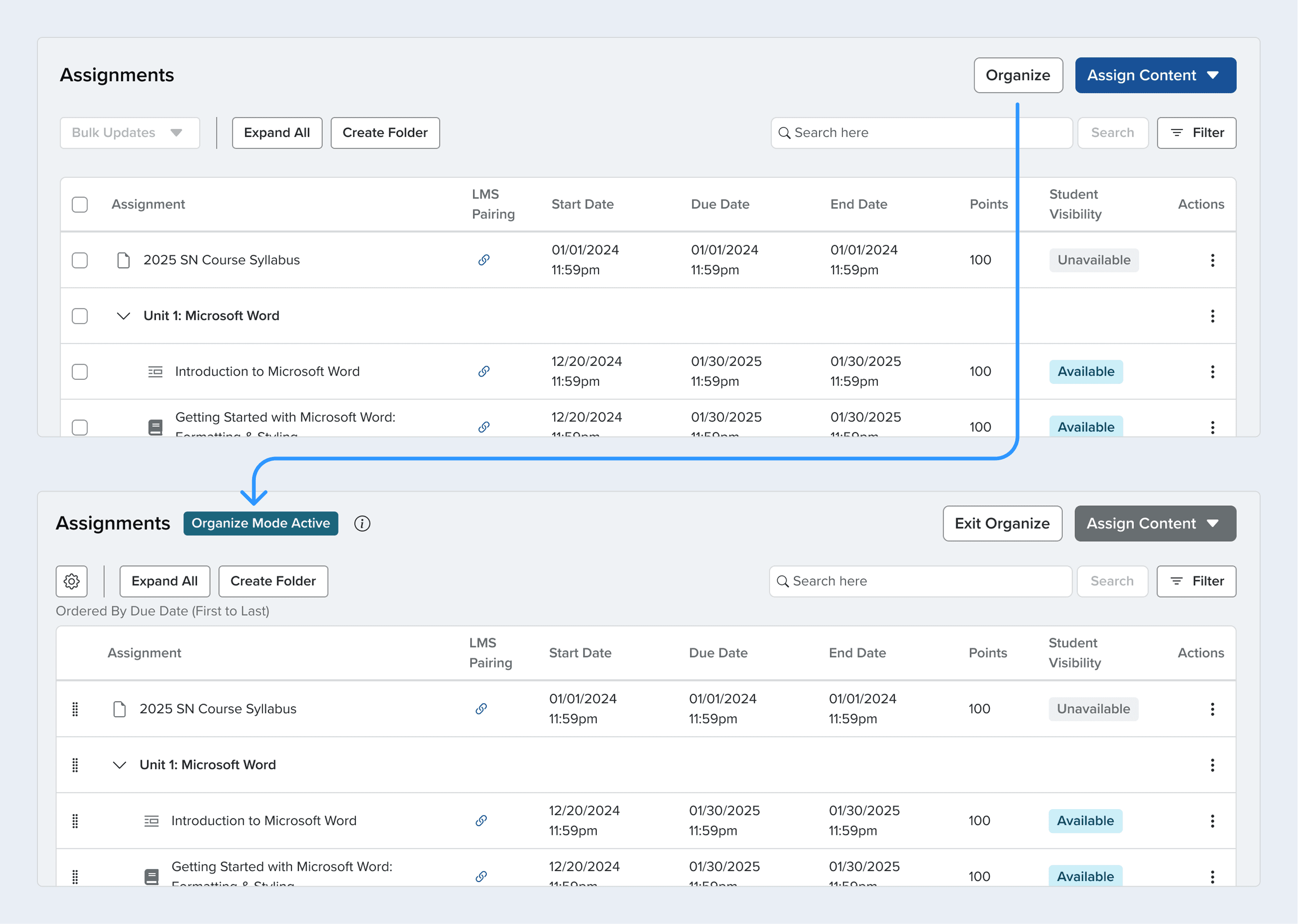
The issue wasn't separated features, but different layouts and discovery
Two modes kept workflows separate while still consolidating three workspaces.
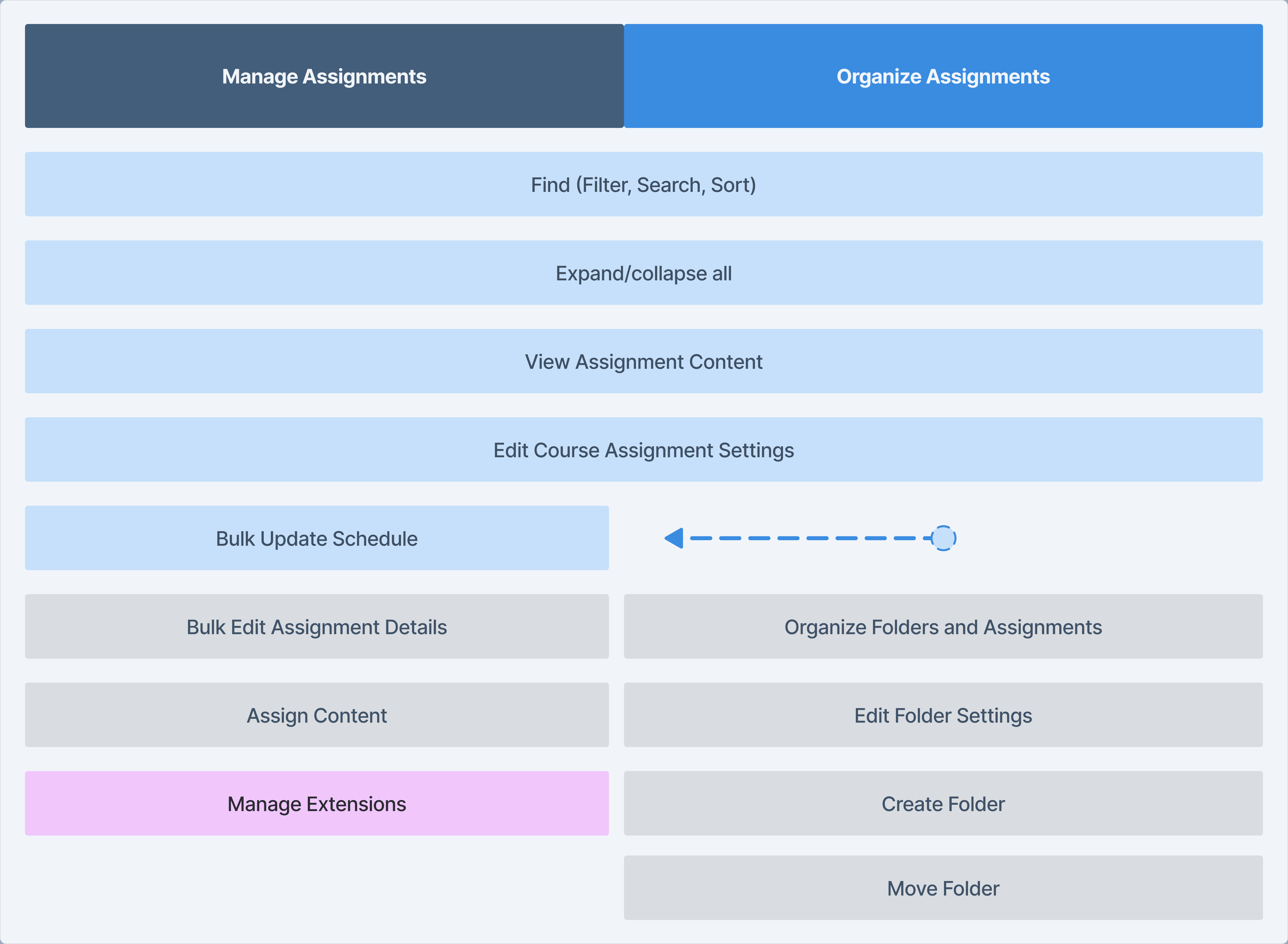
Separate yet closely connected and related
Refining organizing
Working closely with developers and my a11y coach, we defined edges cases for dragging into and out of folders.
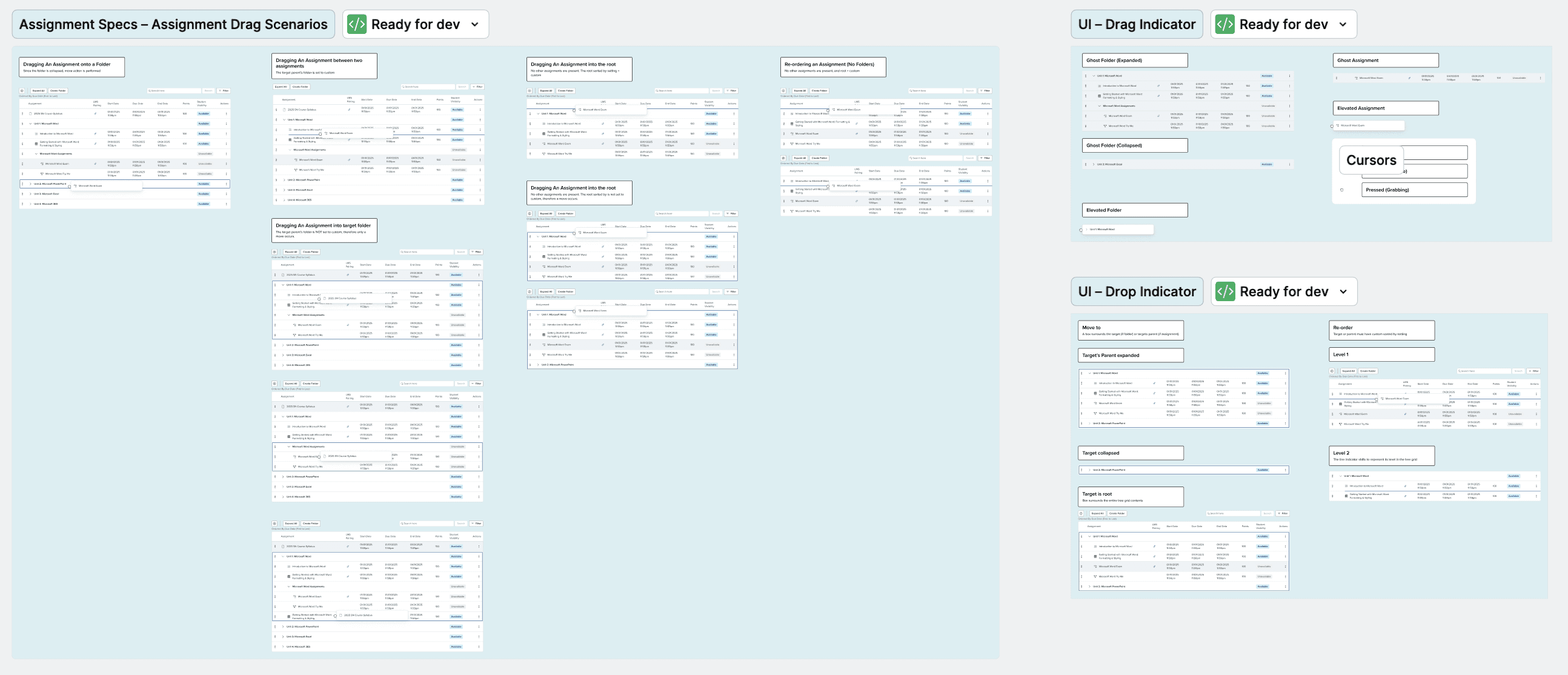
Behavior specs for drag-and-drop
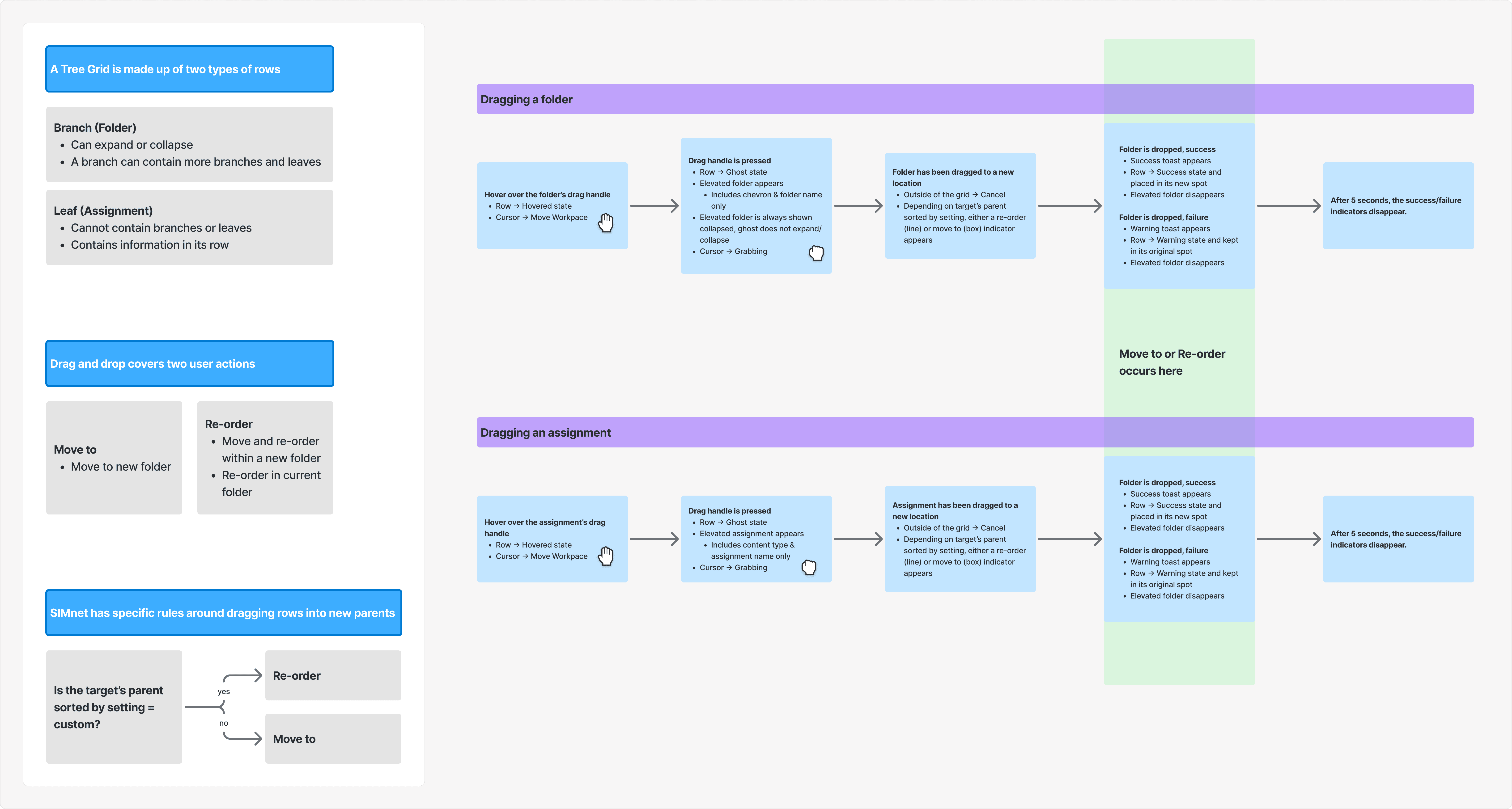
Behavior specs for drag-and-drop
Impact
The redesign transformed how instructors managed their courses, with measurable improvements across our success metrics.
Discoverability improved, support dependency reduced
Task completion rates jumped from 20% to 90% in usability testing. The majority of Instructors could complete complex workflows like bulk-scheduling and organizing without support.
Satisfaction improved significantly
Assignment management NPS increased 6 points from 23 to 29, and in final testing, all 10 instructors preferred the redesigned experience.
Reflection
I was convinced that for assignment organizing, instructors would want everything in one workspace, like modern productivity tools. However, a few stakeholders suspected it would be overwhelming for instructors, and rapid validation prototype testing validated their concerns. Although not the "ideal" solution, it was the right one for our product and the people who use it. We gained a lot of trust for each other after working through this that carried on to other projects.